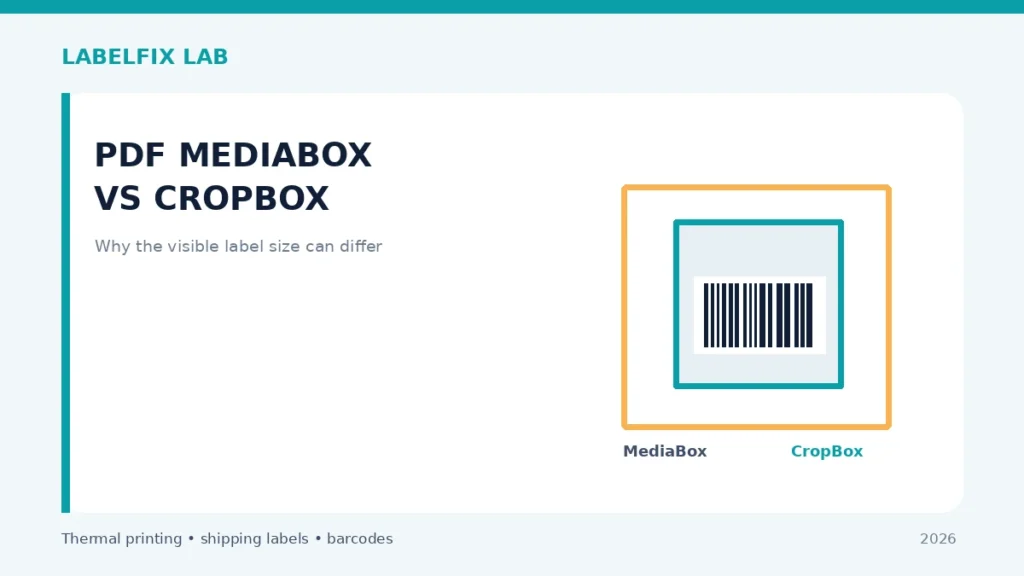
A PDF page can have more than one rectangular page box. The MediaBox describes the fundamental page boundary, while a CropBox commonly defines the region displayed or printed by a PDF viewer. When they differ, a label may appear to be 4×6 inches while the underlying media extent is larger. This matters when diagnosing cropped edges or conflicting page-size reports.
First rule: Compare one non-live sample with the original source or device test. Keep track of settings changed and avoid unapproved driver downloads, repair commands or external websites handling live shipping data.
Match the symptom to the correct layer
| Visible symptom | Start here |
|---|---|
| One reader reports 4×6, another lists a larger page | Possible differences in page-box interpretation |
| Content visibly cropped before printing | Source CropBox or intended visible page area |
| Document displayed upright but dimensions appear swapped | Page rotation metadata may affect presentation |
| Printer clips content although PDF preview is complete | Driver printable area or scaling beyond PDF page boxes |
A practical diagnostic procedure
1. Know what MediaBox represents
MediaBox is a foundational rectangle for a PDF page. Its dimensions come from PDF coordinates, conventionally points where 72 points equal one inch in the typical user-space scale. Other properties, including rotation and user units, can affect display. A simple inch calculation is useful but not a universal statement about all PDF files.
2. Understand what CropBox affects
CropBox specifies the intended visible region of a page and can be smaller than MediaBox. A preview may display only that area, making a label look 4×6 although the full page rectangle is different. The file’s actual shipping artwork might still be clipped within the chosen crop.
3. Inspect what your measurement tool reports
Our local PDF size checker uses the CropBox when the PDF library exposes it, and falls back to page size otherwise; it applies quarter-turn rotation to its displayed width and height. It does not inspect actual barcode quiet zones or validate the content.
4. Compare two trusted readers with the same original PDF
Avoid different screenshots or exports. Record page count, displayed width/height and where crop edges fall. If the readers disagree, inspect the source document’s boxes using a PDF tool that explicitly displays page geometry rather than choosing an arbitrary new driver size.
5. Check that the label content fits its visible region
A CropBox can intentionally hide content outside the page area. If part of the carrier barcode or route marking has been removed by the source, ask the shipping platform for a correct original export. Changing printer settings cannot restore missing source information.
6. Differentiate rotation from a size mismatch
A 90-degree or 270-degree page rotation typically swaps the apparent width and height. That is different from making a 4×6 page into Letter. Use the rotation guide if the document is inverted but otherwise complete.
7. Avoid editing real carrier page boxes blindly
CropBox, BleedBox, TrimBox and ArtBox serve different PDF workflows. Adjusting them without knowing what is hidden can remove required barcode data or place it outside the printer’s stock. Prefer the platform’s supported native thermal-label export.
8. Verify a single test print at the required scale
Compare the source PDF geometry, app preview, driver stock and physical paper output. Check all address lines and barcode clear margins. A PDF reporting 4×6 in one box is not certification that its layout is accepted by the carrier.
What the outcome means
PDF page boxes explain why two viewers or size tools can report different dimensions. If the source crop hides required data, obtain a correct carrier export; if the PDF is complete and only the printed paper clips, inspect the printer’s stock settings and printable area.
Final quality and safety check
Before printing real shipments, verify the complete output from the supported carrier or manufacturer application. Confirm the original page dimensions, barcode geometry, unprinted clear area, recipient and service details. A document being readable on screen does not guarantee the physical printer is compatible, and a barcode that one phone scans is not proof of carrier acceptance.
Worked example: a hypothetical diagnostic case
Suppose a page-size utility reports that the visible shipping label is 4×6 while a different PDF inspector shows a Letter-sized underlying page. This does not automatically mean either tool is defective. Check whether one reports the CropBox and another the MediaBox; then inspect what the source reader actually displays. If the CropBox hides part of the carrier barcode, changing paper settings will not restore the missing source content. Conversely, if both digital views display the entire barcode and only the printed output clips it, the issue may be the printer’s stock width, driver offsets or printable area. Use the originating shipping platform’s own 4×6 export when possible.
What not to conclude from one test
A CropBox of 288×432 PDF points corresponds to 4×6 inches in the common coordinate scale, but page geometry alone does not certify artwork or account for every possible PDF UserUnit behavior. Always inspect the actual content.
Keep an accurate test record with the model, interface, source file, material and original settings, then document one controlled change and its physical outcome. Avoid putting customer identifiers in public screenshots. This is an illustrative scenario, not a claim of direct testing of a particular product.
Frequently asked questions
Is CropBox always equal to MediaBox?
No. They can differ; one often defines the visible region while the other defines the fundamental page boundary.
Does a 4×6 CropBox guarantee a correct shipping label?
No. It describes geometry, not barcode content, stock alignment or carrier approval.
Can page rotation swap width and height?
Yes, quarter-turn display rotation can swap the interpreted orientation, depending on the viewing or printing tool.
Editorial note: These general procedures are not vendor-specific instructions or proof of live device testing. Use the exact printer manual and carrier specifications. See our technical sourcing policy.
Independent general troubleshooting information for shipping labels and thermal printers. Model-specific button sequences, cleaning supplies and service instructions can differ; consult your manufacturer's official documentation. Never alter a carrier-generated barcode.